> For the complete documentation index, see [llms.txt](https://openledger.gitbook.io/openledger/llms.txt). Markdown versions of documentation pages are available by appending `.md` to page URLs; this page is available as [Markdown](https://openledger.gitbook.io/openledger/product-walkthrough/model-factory.md).
# Model Factory
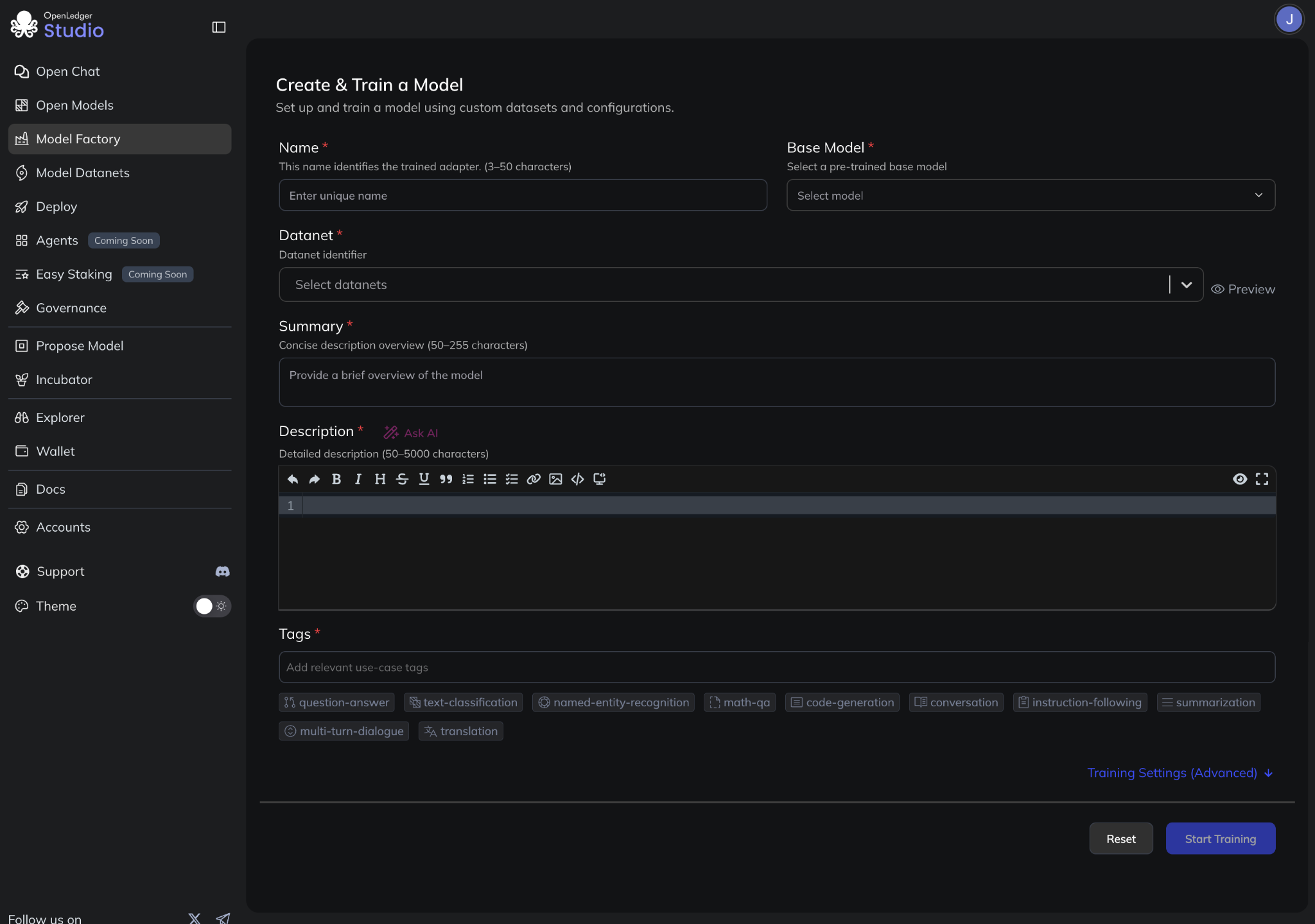
ModelFactory is a fine-tuning platform for Large Language Models (LLMs) that operates under the OpenLedger ecosystem. Unlike traditional fine-tuning frameworks, ModelFactory provides a GUI-only experience, eliminating the need for command-line tools or API integrations
### **Train a model**
1. Navigate to **Model Factory**
2. Enter the metadata:
* **Name**
* **Summary**
* **Description** (supports markdown)
* **Tags**
* **Example Prompts**
3. Select the appropriate **Base Model** and **Datanets**.
4. Advanced settings (For more detailed check dedicated section below):
* **Data Configuration:** stage, cutoffs, limits
* **Training Parameters:** learning rate, epochs, optimizer,..
* **Fine-tuning Configuration:** rank, dropout, alpha
* **Performance Optimization:** Flash Attention, precision
* **Prompt Templates**
5. Click **Create** to start training.
For model training the user has to pay the fee in OPEN. Refer fee in Fee section.
**Note:** A model requires a minimum of 1,500 Datanet rows to enable attribution. Models remain private upon creation. Owners can interact with their models through chat without credit deductions.
### Model Deployment
After training:
1. Once model trained, you can test the model and compare the model response with its base model.
2. You need to Deploy the model to make it public. Click **Deploy** to deploy the model
3. Review the fee breakdown and confirm.
4. Approve the wallet transaction.
5. Once deployed
* The model becomes public.
* It appears under **Open Models** and **Open Chat**.
* It can be starred, and used by others.
## Advanced Settings
### **1. Data Configuration**
#### **Stage**
* **Description**: Specifies the training stage.
* **Value**: `sft` (Supervised Fine-Tuning)
* **Explanation**: Indicates the model is being fine-tuned using supervised learning on labeled data (e.g., instruction–response pairs).
#### **Cutoff Length**
* **Description**: Maximum number of tokens allowed in each input sequence.
* **Default**: `2048`
* **Explanation**: Any input sequence longer than this length will be truncated. This helps manage memory and computational limits during training.
#### **Max Samples**
* **Description**: Maximum number of training samples to use.
* **Default**: `1000000` (1 million)
* **Explanation**: Limits the number of data samples used during training. If set to `0`, all available data is used.
***
### **2. Training Parameters**
**Preprocessing Num Workers**
* **Description**: Number of worker threads used to preprocess data in parallel.
* **Default**: `16`
* **Explanation**: More workers can speed up preprocessing but may consume more system resources.
#### **Per Device Train Batch Size**
* **Description**: Number of samples processed in a single forward/backward pass per GPU.
* **Default**: `2`
* **Explanation**: Affects GPU memory usage. Smaller values reduce memory requirements but may increase training time.
#### **Gradient Accumulation Steps**
* **Description**: Number of steps to accumulate gradients before updating model weights.
* **Default**: `8`
* **Explanation**: Useful for simulating a larger batch size without increasing per-GPU memory usage.
#### **Learning Rate**
* **Description**: Controls how much to adjust the model’s weights during training.
* **Default**: `0.00005` (5e-5)
* **Explanation**: A smaller learning rate offers more stable training; a higher rate speeds up learning but risks instability.
#### **Number of Training Epochs**
* **Description**: Total number of passes through the entire training dataset.
* **Default**: `1`
* **Explanation**: Each epoch sees the full dataset once. More epochs may improve accuracy but can lead to overfitting.
#### **LR Scheduler Type**
* **Description**: Strategy used to adjust the learning rate during training.
* **Value**: `cosine`
* **Explanation**: Reduces the learning rate following a cosine curve. Helps with smooth convergence over time.
#### **Max Gradient Norm**
* **Description**: Gradient clipping threshold.
* **Default**: `1`
* **Explanation**: Prevents gradient explosion by capping the gradient norm.
#### **Warmup Steps**
* **Description**: Number of steps to gradually increase the learning rate at the start.
* **Default**: `0`
* **Explanation**: Can stabilize early training, especially when using larger learning rates later.
#### **Optimizer**
* **Description**: Optimization algorithm used to update model weights.
* **Value**: `adamw_torch`
* **Explanation**: AdamW combines Adam optimization with weight decay for better generalization.
***
### **3. Fine-Tuning Configuration**
#### **Fine-Tuning Type**
* **Description**: Specifies the fine-tuning technique.
* **Value**: `lora`
* **Explanation**: LoRA (Low-Rank Adaptation) reduces the number of trainable parameters by inserting lightweight adaptation matrices.
#### **LoRA Rank**
* **Description**: The rank used for the low-rank decomposition.
* **Default**: `8`
* **Explanation**: Controls the dimensionality of the LoRA layers. A higher rank allows more expressiveness but uses more memory.
#### **LoRA Alpha**
* **Description**: Scaling factor for the LoRA updates.
* **Default**: `16`
* **Explanation**: Multiplies the LoRA output to control update magnitude.
#### **LoRA Dropout**
* **Description**: Dropout rate applied to LoRA layers.
* **Default**: `0`
* **Explanation**: Dropout helps regularize the model. `0` means no dropout.
#### **LoRA Target**
* **Description**: Specifies which layers in the model will be modified by LoRA.
* **Value**: `all`
* **Explanation**: LoRA is applied to all eligible layers (typically attention and feedforward layers).
***
### **4. Performance Optimization**
#### **Flash Attention**
* **Description**: Uses a memory-efficient attention mechanism.
* **Value**: `auto`
* **Explanation**: Automatically uses FlashAttention if supported by the hardware and model architecture. Reduces memory usage and speeds up training.
#### **Sequence Packing**
* **Description**: Enables sequence packing for improved throughput.
* **Explanation**: Combines multiple sequences into one batch to improve hardware utilization and reduce padding overhead.
#### **Compute Types**
* **Description**: Precision used during training.
* **Value**: `bf16` (bfloat16)
* **Explanation**: Reduces memory usage and speeds up training while maintaining numerical stability on supported hardware.
#### **DDP Timeout**
* **Description**: Timeout (in seconds) for initializing distributed training (DDP).
* **Default**: `180000000`
* **Explanation**: Ensures sufficient time for multi-GPU setups to synchronize, especially useful in cloud environments.
***
### **5. Template Configuration**
#### **Template**
* **Description**: Defines the prompt format used to train the model.
* **Value**: `default`
* **Explanation**: Specifies how input-output pairs are structured during training. This is crucial for instruction-tuned models.